
There is a question I have been asked in one form or another by every administrator who has ever inherited a tenant full of Copilot Studio agents, and it always arrives with the same slightly worried tone: "what are all these app registrations in Entra, and which agent does each one belong to?" It is a fair question. For years the answer was that Copilot Studio quietly provisioned an Azure app registration for every agent you created, those registrations piled up in Microsoft Entra ID looking exactly like every other application in the tenant, and telling them apart was an exercise in cross-referencing GUIDs. Not exactly a governance story.
Well, in late August three articles landed in the Copilot Studio documentation that finally close that loop, and one of them is the migration runbook administrators have been waiting for.
Background
Two brand new pages and one substantially rewritten page, all last updated on August 27, 2026:
- Agent identities and authentication for Copilot Studio, new, a plain-language explainer written as a set of questions.
- Migrate Copilot Studio agents to Microsoft Entra Agent ID, new, and the reason for this post.
- Microsoft Entra Agent IDs for Copilot Studio agents, rewritten with the migration guidance and the transition-period rules.
Now, the model itself, because the terminology is new and worth pinning down before anything else. A Microsoft Entra Agent ID is a Microsoft Entra service principal with an "Agent" subtype. That is the whole definition. It is not a new protocol and not a new token type. The documentation is careful about this: the underlying OAuth-based authentication flow remains the same. What changes is that the agent is now a first-class object in Entra that an administrator can see, govern, and write policy against, rather than an anonymous app registration sitting in a list of four hundred others.
Copilot Studio has been creating these automatically for every new agent since May 2026. Agents created before that date still carry the legacy app registration, and here is the sentence that turns this from trivia into a project: existing agents will be migrated by Microsoft automatically in a future update. So the migration is happening either way. The only decision in front of you is whether it happens on your schedule or on Microsoft's.
NOTE: one other thing changed in the same rewrite and it is easy to miss. Previously you could opt out of Entra Agent ID at the environment level. That option is gone. All new agents get Microsoft Entra Agent IDs and you can no longer opt out of automatic agent identity creation. There is also now a tenant-level object called the Microsoft Copilot Studio agent identity blueprint, added the first time an agent is created after the rollout, with a corresponding blueprint principal.
The Solution: an in-place conversion with a rollback
Here is the design decision worth slowing down for, and it is the one that makes the whole thing usable in a real tenant.
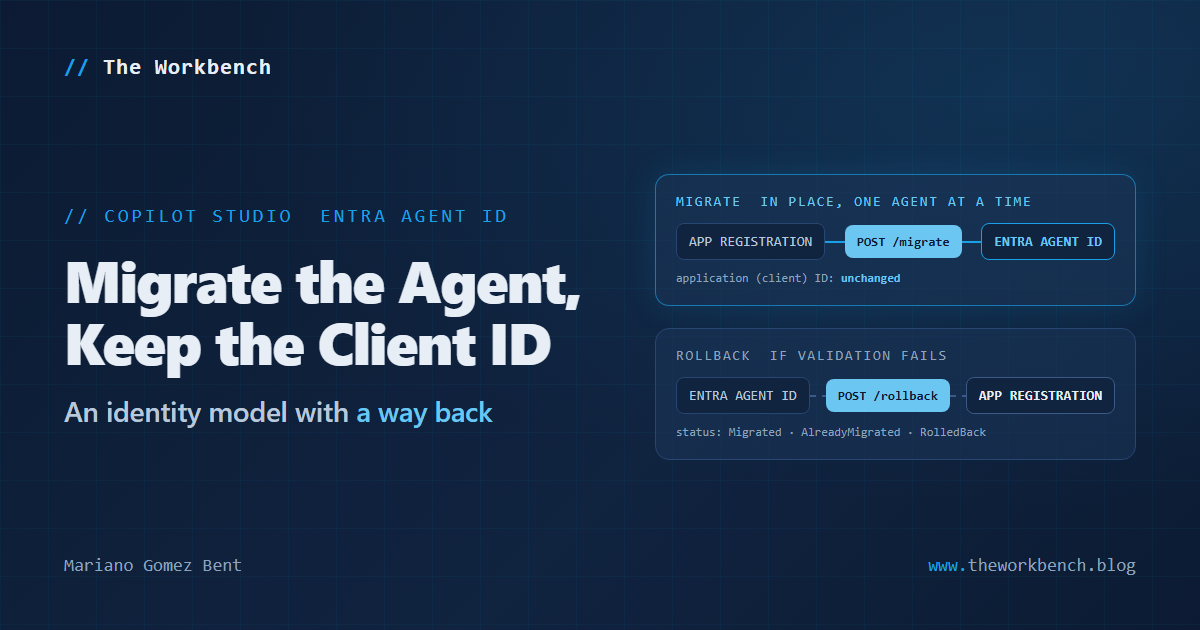
Migration converts an agent's existing app-registration identity in place. The agent keeps its application (client) ID. Everything downstream that resolves against that identifier, channel registrations and connectors among them, continues to resolve to the same value. The agent additionally gains an Entra Agent ID that administrators can manage.
You may be asking why that detail deserves its own paragraph. Frankly, the answer is simple: the alternative would have been catastrophic. An identity migration that issued a new client ID would break every channel registration, every connector configuration, and every downstream system that had that GUID written into a config file somewhere, all at once, across an entire estate. Keeping the client ID is what turns "a migration nobody will ever run" into "a migration you can pilot on Tuesday."
And it is reversible. There is a documented rollback that reverts an agent to its legacy app-registration identity, which means you can validate an agent after migrating it and put it back if it does not pass. A migration path with a documented way back is a rarer thing than it should be, and whoever fought for it deserves the credit.
What you get in exchange for the trip: a first-class agent identity that administrators can view and govern in Microsoft Entra, Conditional Access and other access policies designed for agentic workloads and scoped to agents rather than inherited from app registrations, and a consistent identity model across the services that work with your agents. The Conditional Access point is the substantive one. Writing a policy that targets agents specifically, rather than catching them incidentally because they happen to be applications, is a capability that did not exist before.
Why it matters
For makers, the honest answer is that this is not your job, but it will land on your calendar anyway. The documented process explicitly requires the administrator to coordinate a validation window with the makers who own the agents being migrated, and to wait for those makers to test before the next batch goes. If you own an agent, expect to be asked to exercise it across every channel it publishes to, run its actions and connectors, and confirm its authentication still behaves. Say yes and block the time. The alternative is finding out during the automatic migration, with nobody watching.
For professional developers and administrators, there are two pieces of work here. The near one is the pilot: identify eligible agents, migrate a representative handful, validate, expand. The further one is Conditional Access, and it is the more interesting of the two. Once agents are first-class identities in Entra, "which policies apply to our agents" becomes a question with an actual answer, and the documentation tells you to review Microsoft Entra sign-in logs including Conditional Access results before you widen a batch. That is a sentence with real work behind it, and it is the part I would start reading up on now rather than during the migration.
Two cautions, both from the documentation rather than invented by me. The manual migration process is currently a preview feature. And the documentation states plainly that migrating agent identities affects live agents and can disrupt authentication, connectors, and integrations if you do not plan the migration carefully. This is not a maintenance-window-free operation dressed up as one.
The demo concept
Not "watch an agent get migrated," because the interesting part of a successful migration is that nothing visible happens. The demonstration worth building is the evidence trail, and it has three parts.
Take one noncritical agent. Before you touch it, capture its application (client) ID and its Entra sign-in log entries. Migrate it through the API so you get the response object rather than a screen full of green checkmarks. Then capture the same two things again and put them side by side: the client ID identical, the agent now present in Entra as a service principal with the Agent subtype, and a sign-in log you can point a Conditional Access policy at. That before-and-after pair is the artifact that gets a change advisory board to approve the rest of the estate, and it is far more persuasive than any amount of documentation quoting.
Steps to recreate
First, the prerequisites, because two of them will stop you cold. You must be a Power Platform Administrator, Dynamics 365 Administrator, or Global Administrator. Power Platform inventory must be enabled for your tenant, because that is how Advisor identifies eligible agents. And you must coordinate a validation window with the makers who own the agents. That third one is not a technical prerequisite, but the documentation lists it as one, and I would treat it exactly that way.
The administrator path, through the Power Platform admin center
1) Sign in to the Power Platform admin center.
2) In the left navigation pane, select Actions.
3) Under Actions, select Recommendations.
4) On the Recommendations tab, select Active.
5) Search for and select Migrate Copilot Studio agents to Microsoft Entra Agent ID for enhanced agent governance.
6) In the recommendation pane, expand Why is this important? and read the migration guidance.
7) Review the eligible agents. Use the Suggested migration order and Migration notes columns to pick your pilot, and note that the table also gives you environment, environment type, owner, recent activity, and authentication method.
8) Select the checkbox next to each agent you want to migrate. The Migrate button becomes available and the action bar shows how many agents you have selected.
9) Select Migrate, review the confirmation, and confirm.
10) Review the Action, Action state, and Action date columns for each agent. The Action history tab shows actions across all recommendations.
 |
| Power Platform Admin Center |
Then stop. Do not queue the next batch. Validate first, and the documentation is specific about what validating means: confirm the agent responds correctly in every channel where it is published, that its actions, connectors, flows and integrations run, that it authenticates as expected including any custom authentication, and that it behaves correctly with applicable agent access policies and Conditional Access policies. Then go read the sign-in logs for those agents in the Microsoft Entra admin center. If an agent fails validation, stop the rollout and revert that agent before continuing.
Keep in mind that Advisor recommendations can remain visible for up to a week after you act on them while the recommendation data refreshes. Seeing the recommendation still sitting there does not mean your migration did not take.
The API path, for when you want your own automation
The admin center is the recommended manual method, but there are Power Platform API endpoints if you would rather script it, and the documentation supplies the samples. Everything needs an OAuth2 bearer token for the Power Platform API:
$token = (Get-AzAccessToken -ResourceUrl "https://api.powerplatform.com").TokenA few things to note. This uses the Az PowerShell module, and the token has to be associated with an account holding one of the three admin roles listed earlier. There is no service-principal shortcut documented here, so if multifactor authentication or Conditional Access requires interactive sign-in, expect a browser window and complete the prompts. This is also the single most common failure in the troubleshooting table, listed as expired credentials or a token error.
To migrate one agent:
$token = (Get-AzAccessToken -ResourceUrl "https://api.powerplatform.com").Token
$environmentId = "<EnvironmentId>"
$botId = "<BotId>"
$uri = "https://api.powerplatform.com/copilotstudio/environments/$environmentId/bots/$botId/api/agentidentitymigration/migrate?api-version=2024-10-01"
Invoke-RestMethod `
  -Method Post `
  -Uri $uri `
  -Headers @{
    Authorization = "Bearer $token"
  }
A few things to note. The request takes no body, which surprised me the first time I read it: the agent is fully identified by the two IDs in the path. You get those two values from the agent inventory in the Power Platform admin center under Manage > Copilot Studio. The API version is pinned at 2024-10-01, so keep it, and note that this endpoint lives on api.powerplatform.com rather than any Copilot Studio host. The response is an AgentIdentityMigrationResult with a status of either Migrated or AlreadyMigrated, which means the call is safely idempotent. Running it twice does not do the migration twice, and that matters a great deal if you are looping over a list of agents and something times out halfway through.
A successful response looks like this:
{
  "status": "Migrated",
  "cdsBotId": "<bot-id>",
  "environmentId": "<environment-id>",
  "tenantId": "<tenant-id>",
  "agentIdentityId": "<agent-identity-id>",
  "applicationId": "<application-client-id>",
  "servicePrincipalObjectId": "<service-principal-object-id>",
  "managedIdentityId": "<managed-identity-id>",
  "completedAtUtc": "2026-08-21T12:00:00Z"
}
A few things to note, and this payload is the reason I would use the API even if I ran the migration from the admin center. Look at what comes back: applicationId, the client ID you can compare against what you captured before, and servicePrincipalObjectId and agentIdentityId, the handles you need to find this agent in Entra afterward. Log the whole object. It is your evidence trail, produced for free, and reconstructing it later from the portal is tedious work you would rather not do.
And to put one back:
$uri = "https://api.powerplatform.com/copilotstudio/environments/$environmentId/bots/$botId/api/agentidentitymigration/rollback?api-version=2024-10-01"
Invoke-RestMethod `
  -Method Post `
  -Uri $uri `
  -Headers @{
    Authorization = "Bearer $token"
  }
A few things to note. Same shape, same authentication, same absence of a body, and the same idempotent design: the response status is RolledBack or NotMigrated. Write this script at the same time you write the migrate script, not after something has gone wrong. A rollback you have already tested on a throwaway agent is a rollback you can actually reach for at four in the afternoon with a maker on the phone.
Companion repo sketch
A small runbook repository, honest about being a runbook. A scripts/ folder with three files and no more: Get-AgentInventory.ps1 to pull the agents and their environment and bot IDs, Invoke-AgentMigration.ps1 that takes a CSV of the batch and writes every response object to disk, and Invoke-AgentRollback.ps1 written first and tested first. A batches/ folder with the CSV per batch, so the pilot, the second wave and the long tail are separate committed files rather than a spreadsheet somebody is editing in place. An evidence/ folder holding the before-and-after client IDs and the raw JSON responses, because that is the artifact that survives the project. And a VALIDATION.md with the checklist from the documentation turned into tick boxes per agent: channels, actions, connectors, flows, integrations, custom authentication, access policies, Conditional Access.
Point the README at a nonproduction tenant for the first run and say so in bold. And put the troubleshooting table in there too, because the four failure modes Microsoft documents are the four you will hit: inventory returning no agents when Power Platform inventory is not enabled or your role is wrong, token and reauthentication prompts, agents skipped because they are already migrated or you left out an ID, and single-agent failures from eligibility, access, or throttling, where the answer is to wait and rerun.
Final Notes
What I keep coming back to is not the identity model, welcome as it is. It is that Microsoft shipped the migration runbook and the rollback and a troubleshooting table with four named failure modes, for a migration it is eventually going to run for you anyway. It did not have to do any of that. It could have flipped the switch on a Tuesday and let us all find out.
So take the invitation. Enable Power Platform inventory, open the Advisor recommendation, pick three agents nobody will miss, and run the pilot while the stakes are zero and the makers are available. The version of this project where you go first is a much better project than the version where you go last.
What I learned from this exercise: the most valuable sentence in a migration document is rarely the one describing the migration. It is the one telling you how to undo it.
Until next post!
MG.-
Mariano Gomez Bent
Former Microsoft BizApps MVP

Comments