
Every one of us who has stood up a model-driven app from nothing has lived the same first afternoon. You know the business process cold, you could describe it to a colleague in ninety seconds, and yet the next four hours go to clicking: a table, then its columns, then the relationships, then a main form, then two views, then a chart nobody asked for, then the sitemap, then the security roles you will get wrong the first time and fix on Thursday. None of that is thinking. It is transcription, and it is the reason so many good internal apps never get built at all.
Well, in late August a new article appeared in the Power Apps documentation that goes after that first afternoon directly, and it did not arrive alone.
Background
A brand new page landed in the MicrosoftDocs/powerapps-docs repository, dated 08/27/2026, and it is live on Learn:
What tells you this is a real shipped surface rather than a stray draft is the company it keeps. In the same set of changes, Steps to building a model-driven app and the Overview of the model-driven app designer both gained a TIP block pointing at the new article, the existing generative pages article gained a NOTE telling you which of the two skills to reach for, and the maker landing page and table of contents were amended to carry it. Microsoft does not wire four existing articles into a page it is not serious about.
Now, the thing itself. It is called the model app builder skill, and it runs inside an AI code generation tool such as GitHub Copilot CLI or Claude Code. A skill, in this context, is a packaged set of instructions and commands that teaches one of those tools how to perform a specific job. It is not a connector, and it is not a service you call. It is guidance the tool loads, plus the command-line plumbing to act on it. The distinction matters, because it means everything the skill does, it does as you, through tools you already have authenticated on your own machine.
What the skill actually produces
This is the part that surprised me, so let me quote the capability list rather than paraphrase it into something vaguer. The documentation says the skill can:
- Create a model-driven app from a description of a business scenario.
- Plan the app around user personas and the jobs they need to accomplish.
- Create supporting tables, columns, relationships, forms, views, charts, and sample data.
- Create generative pages for experiences that go beyond standard forms and views.
- Create a sitemap with custom icons for each table.
- Add JavaScript validation rules to forms.
- Add security roles based on the planned personas and data access needs.
- Edit an existing model-driven app by describing the changes you want.
- Verify the deployed app against the approved specification.
Read that list twice. Security roles derived from personas. Sitemap icons and form validation created as web resources and wired to the right components during implementation. That is not a scaffolder producing a table and a form and calling it an app. That is the boring 80 percent of the first afternoon, including the parts people skip.
The Solution: the dry run is the whole feature
Here is where I would slow down, because the interesting design decision is not the generation. It is the gate in front of the generation.
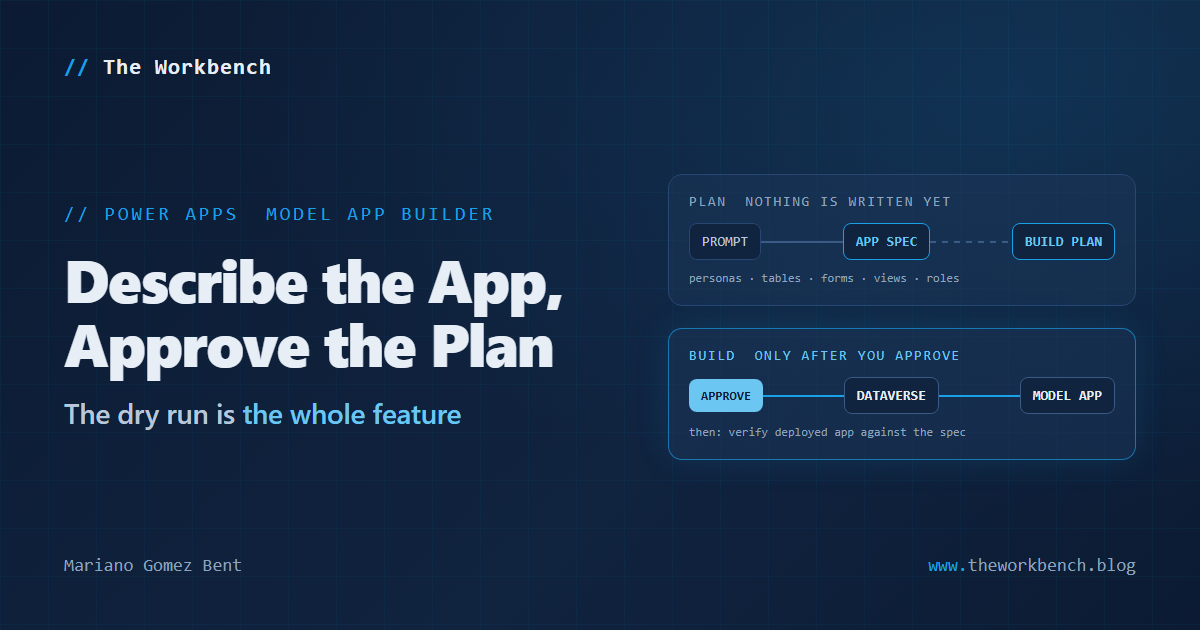
The skill runs an interactive, multistep process, and the documentation is explicit about the order. You describe the business scenario, and the skill asks follow-up questions about users, data, workflows and the experience you want. It then presents an app spec: personas, jobs to be done, tables, relationships, forms, views, charts, JavaScript validation rules, generative page intents, and the sitemap with a proposed icon for each table. You review and refine that specification. Only then does it validate the spec and present a dry-run build plan, grouped by build phase, in the conversation. And then the sentence that carries the whole design:
No app artifacts are created until you approve the plan.
You may be asking why a plan step deserves this much attention when every generator ever built has had a preview mode. Very simple: the failure mode of an AI that writes to Dataverse is not a bad form. It is thirty artifacts you did not ask for, scattered across a solution, with a publisher prefix on all of them and no obvious way to tell which ones matter. A plan you can read and argue with before anything is written is the difference between a tool you can use in a real environment and a tool you can only use in a sandbox you are willing to throw away.
After the build, there is an optional verification step that compares the deployed app with the approved app spec. That is worth noticing too. "The build reported success" and "the app matches what I approved" are two different claims, and only one of them is worth anything on Monday morning.
NOTE: the editing path is the same skill and it works in reverse. Point it at an existing app and it retrieves the deployed app, builds an editable app spec from it, and then proposes changes against that spec. Which means the spec is not just an input format. It is a two-way representation of the app, and that is the part of this design most likely to still be here in three years.
Why it matters
For makers, this is genuinely for you, and that is a change from most of what lands in the developer docs. The article is tagged for makers and developers both, and the entry point is a sentence about your business process rather than a table designer. But be honest with yourself about the toolchain: this needs Node.js, the Power Platform CLI, the Azure CLI, and a terminal-based AI coding tool on your machine. If you have never opened a command prompt on purpose, the skill is not the barrier. The prerequisites are. That is a fair trade to know about up front rather than discover forty minutes in.
For professional developers, the claim worth weighing is the app spec. We have spent years arguing about how to describe a model-driven app in a form that survives review, diffing and source control, and the answers have all been either solution XML, which nobody enjoys reading, or a wiki page that goes stale in a week. A reviewable specification that generates the app and can be regenerated from the app is a different proposition. Whether the schema holds up is an open question, and the documentation says plainly that it might change between releases, but the shape is right.
Two cautions, both taken from the documentation rather than invented by me. This is preview, and Microsoft states that the app spec schema and command-line options might change between releases. And the skill does not support every model-driven app artifact or concept, so some of your app will still be built in the designers. The related warning is the one I would put on a sticky note: changes you make outside the skill can affect later AI-assisted edits, so before you approve another build, read the plan to confirm it preserves your manual customizations. An agent that regenerates from a spec has no idea what you changed by hand unless the spec caught it.
The demo concept
Not "watch it build an app," because a video of artifacts appearing proves nothing about whether they were the right artifacts. The demonstration worth building is the round trip, and it takes three moves.
Build a small app from a prompt and keep the approved app spec. Then go into Power Apps and change something by hand that the spec never knew about, a business rule, a column on a form, a tweaked view. Then ask the skill for an unrelated change and read the new plan carefully to see whether your manual work survives. That single observation is more useful than any amount of generation footage, because it answers the only question a working developer actually has: can I use this on an app I care about, or only on one I am willing to lose?
Steps to recreate
1) Get the prerequisites in place first. The documentation lists a current long-term support version of Node.js, Power Platform CLI (PAC CLI) 2.7.0 or later, the latest Azure CLI, and GitHub Copilot CLI or Claude Code. You also need a Power Platform environment where you can create and modify Dataverse and model-driven app artifacts, an authenticated PAC CLI profile pointed at that environment, and an authenticated Azure CLI session.
2) Make sure both authentications are the same person. This is the one prerequisite that reads like a footnote and behaves like a blocker:
az loginA few things to note. The documentation is specific that you run az login with the same identity used by the active PAC CLI profile. Two different accounts across the two CLIs is the classic way to get a confusing permission error much later in the run, long after you have forgotten which account each tool holds. Check the active PAC profile with pac auth list before you start, and if the two do not match, fix it now rather than at step six.
3) Install the plugin. There is a one-line installer that sets up all of the Power Platform plugins at once, in PowerShell:
iwr https://raw.githubusercontent.com/microsoft/power-platform-skills/main/scripts/install.js -OutFile install.js; node install.js; del install.jsA few things to note. This downloads a JavaScript file, runs it with Node, and deletes it, which is exactly the kind of command you should read before you run. The installer detects which supported AI code generation tools you have, registers the Power Platform Skills marketplace, installs the plugins, and turns on automatic updates. The source lives in the public microsoft/power-platform-skills repository, so you can read scripts/install.js first, and I would encourage you to do exactly that. There is an equivalent for a Windows command window:
curl -fsSL https://raw.githubusercontent.com/microsoft/power-platform-skills/main/scripts/install.js | node4) Or install just the one plugin, which is what I would do the first time. These are slash commands typed into the AI coding tool's own chat, not shell commands:
/plugin marketplace add microsoft/power-platform-skills
/plugin install model-apps@power-platform-skills
A few things to note. The first command registers the marketplace, the second installs the Power Apps plugin from it, and the part after the @ is the marketplace name. Restart the tool afterward if it does not pick up the plugin on its own. For Claude Code specifically, the documentation points out that plugins can be installed at global, local or user scope, and that depending on the scope you must be in the correct directory for the plugin to load. If the skill appears to be missing, check where you are standing before you reinstall anything.
5) Build something. Start a conversation with the tool and invoke the skill:
/app-builder

Build an equipment inspection app for field technicians and dispatchers.
A few things to note. That example prompt is quoted from the documentation, along with "Build an app to manage supplier onboarding and contract approvals" and "Create a model-driven app for tracking service requests across multiple teams." Notice the shape they all share: a business process and the people in it, not a list of tables. That is deliberate, because personas are a first-class part of the app spec and they are what the security roles get derived from. You can also skip /app-builder and simply describe the app you want.
6) Then work the review, which is the part that earns the whole exercise. Answer the skill's questions about the process, users, data and workflows. Read the app spec and check that the personas, jobs to be done, tables, relationships, forms, views, charts, validation rules, generative pages, navigation and sitemap icons actually support the business scenario, and ask for revisions until they do. Read the dry-run build plan and approve it only when its proposed changes match your intent. Let it build. Take the optional verification step. Then open the app at make.powerapps.com, run its primary scenarios, and inspect the generated artifacts with your own eyes.
7) To edit an app you already have, invoke /app-builder again and name it:
/app-builder

Add an Invoices table and related forms and views to the Supplier Management app.
A few things to note. The skill asks you to confirm which existing app it should retrieve, then presents an editable app spec built from the deployed app, and then the same plan-and-approve cycle applies. This is the path where the caution about manual customizations bites, so read that plan properly rather than skimming for the word "success."
One more thing that landed in the same set of changes
The generative pages article picked up a genuinely useful capability that has nothing to do with AI coding tools, and it would be a shame to let it get buried: you can now embed a generative page inside a model-driven app form, in a section or a tab. Create and publish a generative page set up to accept the recordId input parameter, then:
1) Open the form in the form designer.
2) In the left pane, select Components, and then expand Display.
3) Select Generative page.
4) Select the generative page you want to embed.
5) Optionally, provide values for any additional static inputs the page accepts.
6) Save and publish the form.
When a user opens a record, the form passes the current record ID to the page as recordId automatically. You do not configure a static value for it. That is a small paragraph in the docs and a fairly large door, because it turns generative pages from a separate destination into something that lives on the record the user is already looking at.
Companion repo sketch
A lab repository built around the round trip rather than the generation. A prompts/ folder with the exact prompts in order, so somebody else can reproduce the run instead of taking your word for it. A specs/ folder holding the approved app spec from the first build and the regenerated spec from after the manual edit, because the diff between those two files is the finding. A plans/ folder with the dry-run build plans exactly as they appeared, including the one you rejected, since a lab that records only the approved plan is hiding the interesting half. A solution/ folder with the exported and unpacked solution so the generated artifacts show up as reviewable files. And a short FINDINGS.md that says which artifacts the skill got right, which it missed, and whether the manual customization survived, in plain language.
Point the README at a developer environment, say so loudly, and repeat it. This is preview software that writes schema. Nobody should be pointing it at production to find out what it does.
Final Notes
What I keep coming back to is that the headline feature of this skill is a document. Not the generation, which is impressive but is the part everybody expected. The app spec is the thing: a reviewable description of a model-driven app, produced from a conversation, editable by a human, capable of building the app and capable of being rebuilt from it. We have wanted that artifact for a very long time, and it is a little funny that it arrives as a side effect of teaching a coding agent to click the designers for us.
It is preview, so treat it accordingly. Read the installer before you run it, keep your two CLI logins on the same identity, use a developer environment, and read every plan before you approve it. And if you take one habit from the whole exercise, make it the verification step, because the gap between "it built" and "it matches what I approved" is where every automation story eventually gets interesting.
What I learned from this exercise: when a tool asks you to approve a plan, the plan is not a formality it added to be polite. It is the tool telling you exactly where the responsibility moves from the machine back to you.
Until next post!
MG.-
Mariano Gomez Bent
Former Microsoft BizApps MVP

Comments