
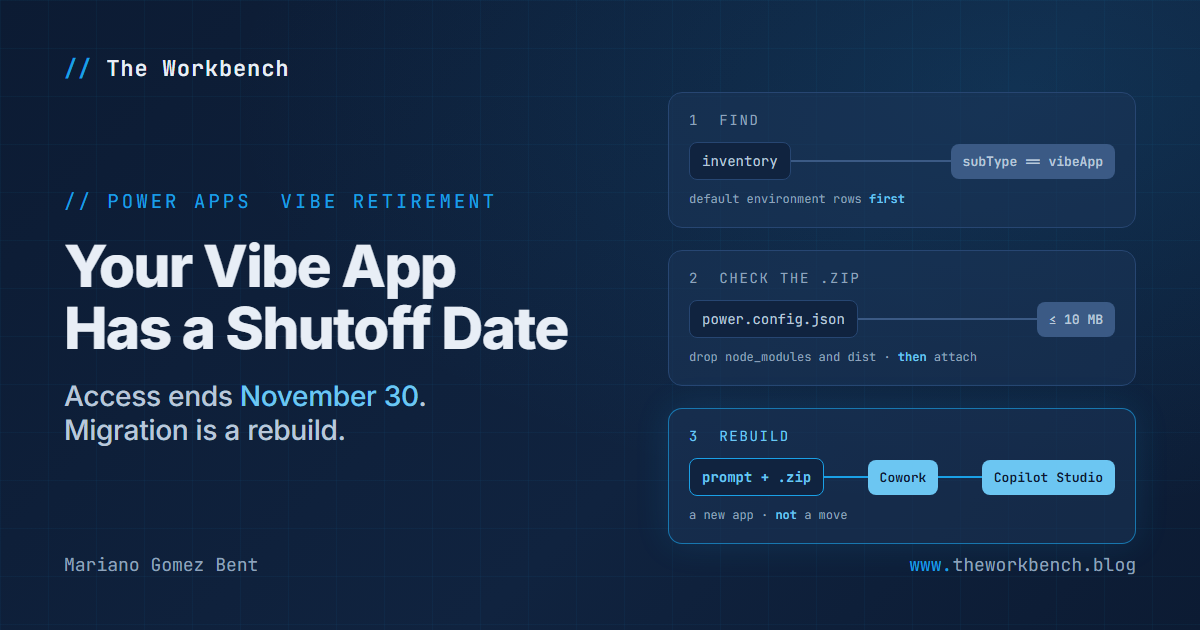
You have until November 30, 2026 to get your apps out of Power Apps Vibe. That date sits in the first paragraph of Migrate apps from Power Apps Vibe, a new article that landed in the Power Apps documentation on October 13, and the same paragraph says in as many words that Vibe is retiring. If anyone in your tenant built an app there, that app has a shutoff date, and the way out isn't an export button. It's a rebuild!
Background
For those who never tried it, Power Apps Vibe (vibe.powerapps.com) is the experience where you describe an app in plain language, review the plan it proposes, and get a working app with its data behind it. Power Platform inventory files each one with the code apps, as microsoft.powerapps/codeapps with a subtype of vibeApp, which is going to matter in a minute.
The migration article lays out four steps: prepare your data, download each app's source code, attach that source to a prompt in one of two places where an agent rebuilds the app, and then review, publish and share the result. The two places are split like this:
- Copilot Cowork, through its App skill in Microsoft 365 Copilot: available only to organizations in the Frontier program, requires a Microsoft 365 Copilot license, bills Copilot Credits, and shares the app by link with people in your organization who can use Microsoft 365 Copilot.
- Apps in Copilot Studio: in public preview, requires access to Copilot Studio with app creation turned on, bills Copilot Credits (app creation runs on the GitHub Copilot harness), and shares with specific people or groups.
The article is just as clear about what doesn't make the trip. Screens, navigation, components and logic are rebuilt from your source code; data in Dataverse tables or SharePoint lists stays put and the new app connects to it. Draft tables aren't migrated, data connections aren't carried over, and ALM isn't supported yet, so a rebuilt app can't move to a test or production environment. And the known limitation I would circle in red: rebuilt apps can't connect to Dataverse tables in the default environment.
One sentence has aged in an interesting way: an automated migration option is "planned for mid-October." When I read the published page on October 30, that sentence was still there and no automated option was documented, so check the page before you start.
Why it matters
For makers, three facts will bite if you skim. Draft tables live in memory only, so if you never published them from Vibe they won't be migrated. If your prompt doesn't name your data, the agent may build on sample data instead, which looks perfectly fine in a demo and is useless the next morning. And the rebuilt app is a new app with a new link and none of the original sharing, so keep the original until the new one is verified, which you can do right up to November 30.
For professional developers and admins, the interesting part surrounds the article. Inventory can list every Vibe app in the tenant with its environment and owner, so nobody has to rely on makers remembering what they built. And there's a third destination the migration article doesn't name: Convert a vibe app to a code app takes the same downloaded source through pa app init, pa app run and pa app push, which gets you an editable code base, source control, and the code apps ALM story the rebuild path doesn't have yet. It also creates a new app, and converted apps may need three image-hosting URLs allowed in the environment's content security policy. Every route starts from the same Download source archive, and that's the one step nobody can do after November 30.
The demo
Rather than pretend to migrate an app I don't have, I built the tool I would want if I were holding a list of Vibe apps and a deadline: vibe-exit-kit. It covers the three places where a small mistake costs a whole rebuild cycle: finding the apps, checking the archive, and writing the prompt. Microsoft's template is long and deliberately literal, and the article warns that phrases like "similar to" invite a redesign and that display names don't work where logical names belong. Those are precisely the mistakes a script can refuse to let you make.
Steps to recreate
1) Find the apps. In the Power Platform admin center, go to Manage > Power Apps and open the App Inventory tab, which lists vibe apps alongside canvas, model-driven and code apps. To query instead, run this in Azure Resource Graph Explorer (it's queries/find-vibe-apps.kql in the repo):
PowerPlatformResources
| where type == 'microsoft.powerapps/codeapps'
| where tostring(properties.subType) == 'vibeApp'
| extend joinKey = tolower(tostring(properties.environmentId))
| join kind=leftouter (
    PowerPlatformResources
    | where type == 'microsoft.powerplatform/environments'
    | project joinKey = tolower(name),
              environmentName = tostring(properties.displayName),
              environmentType = tostring(properties.environmentType)
  ) on $left.joinKey == $right.joinKey
| project appName = tostring(properties.displayName), appId = name,
          environmentName, environmentType,
          environmentId = tostring(properties.environmentId),
          ownerId = tostring(properties.ownerId),
          lastModifiedAt = todatetime(properties.lastModifiedAt)
| sort by environmentType asc, lastModifiedAt desc
The first two filters do the real work: per the inventory schema reference, a Vibe app is a code app whose subType is vibeApp. The join borrows each environment's type, because environmentType is what tells you an app sits in the Default environment, where a rebuild can't reach its Dataverse tables. ownerId is an Entra object ID you'll still need to resolve to a person. The repo carries the same query as an inventory API request body for the preview command pac resource-query query-resources --body "@queries/find-vibe-apps.json"; the API accepts only delegated user tokens and one of the roles the inventory article lists, such as Power Platform administrator. I haven't run this query against a tenant; it uses only documented clause types and fields.
2) Publish draft tables. Sign in to vibe.powerapps.com, open the app to edit, select Publish, and choose the environment under Data environment.
3) Download the source. Open the app, select Edit, then select Download source on the command bar. Leave the .zip file as it is: you attach it without extracting it.
4) Check the archive before you spend credits on it:
./scripts/Test-VibeSource.ps1 -ZipPath ./FleetServiceLog.zip
[WARN] 'Fleet Service Log' lives in the default environment (Default-aaaabbbb-0000-cccc-1111-dddd2222eeee). If it uses Dataverse tables, a rebuilt app cannot connect to them: Learn lists this as a known limitation of the migration.
[INFO] 2 file(s) under node_modules or dist (11,000,014 bytes uncompressed). Generated folders; safe to drop before attaching.
[BLOCK] The archive to attach is 11,004,168 bytes; Apps in Copilot Studio accepts attachments of 10 MB or smaller. Run again with -RepackPath to drop node_modules and dist.

./scripts/Test-VibeSource.ps1 -ZipPath ./FleetServiceLog.zip -RepackPath ./FleetServiceLog-trimmed.zip
That output came from a synthetic archive built to the layout the conversion article documents (an apps folder with one folder per app, each holding its power.config.json), with a default environment and an oversized node_modules planted on purpose; I haven't run it against a real Vibe download. The script reads the archive in place, takes environmentId from power.config.json, and checks the size against the 10 MB attachment limit for Apps in Copilot Studio, read as 10,000,000 bytes to stay safe. The second command writes a copy without node_modules and dist, which is what the article's troubleshooting table says to remove. Exit code 1 means something blocks.
5) Collect your data details. For Dataverse, copy the environment ID from the Power Platform admin center (Manage > Environments, select the environment, then Environment ID in the Details section), and each table's logical name from make.powerapps.com (Tables, open the table, then Tools > Copy logical name). For SharePoint, you need the site URL, meaning the part before /Lists/, and the list names.
6) Describe the app in a small JSON file:
{
  "appName": "Fleet Service Log",
  "whoUsesTheApp": "maintenance coordinators",
  "doWhat": "book vehicles in for service, log the work done, and see which vehicles are due next",
  "screens": ["Fleet", "Vehicle details", "Service history", "Due soon"],
  "mainTasks": "book a service, close it out with parts and labor, and reschedule a missed booking",
  "data": {
    "kind": "dataverse",
    "environmentId": "aaaabbbb-0000-cccc-1111-dddd2222eeee",
    "tables": ["cr8a1_vehicle", "cr8a1_servicebooking", "cr8a1_servicelineitem"]
  }
}
Each field fills one placeholder in Microsoft's template: whoUsesTheApp and doWhat become the sentence that tells the agent what the app is for, and data.kind selects one of the article's three data instructions, dataverse, sharepoint or none. For SharePoint, replace environmentId and tables with siteUrl and lists. The environment ID shown is the article's own placeholder GUID, so substitute yours.
7) Generate the prompt:
./scripts/New-VibeMigrationPrompt.ps1 -ConfigPath ./samples/dataverse-app.json -OutFile ./prompt.txt

./scripts/New-VibeMigrationPrompt.ps1 -ConfigPath ./samples/broken-app.json
'similar to' found in: 'sign visitors in and out, with a look similar to our old lobby kiosk'. Learn's tip: those phrases ask the agent for a new design instead of a faithful rebuild.
The template itself isn't in the repo. The script downloads the article's Markdown from the public MicrosoftDocs/powerapps-docs repository on every run, finds the template and the data instructions by their headings, and fills the placeholders, so the prompt matches the page on the day you use it. Two behaviors are deliberate. It refuses to print a prompt when the input would quietly undermine the rebuild: an environment ID that isn't a GUID or starts with Default-, a table name with uppercase letters or spaces (almost always a display name), or the phrases the article warns about, as the broken sample shows. And if Microsoft adds a placeholder the script doesn't recognize, it stops and names it rather than handing you a prompt with a hole in it.
8) Rebuild. In Copilot Studio, go to copilotstudio.microsoft.com, select the App tile on Home (or Apps (Preview) > New app), paste the prompt, select + to attach the .zip file, and select Submit. If you don't see the App tile, turn on the New experience toggle on Home. Answer any follow-up questions; if the agent builds in stages, reply Continue with the deferred items until it's done, then review Data and Connections from the app's dropdown menu. In Cowork, go to copilot.cloud.microsoft, select Cowork, type /app followed by a space, paste the prompt, attach the .zip through Add attachments (+) > Upload images and files, and select Send.
9) Verify before you share. The new app should show your existing records, not sample data, and you should create, edit and delete a test record to prove it can write. If it shows sample data, the article's Verify your data connections section has a short follow-up prompt for exactly that case. Then select Publish and Share, and tell your users where the new app lives.
Companion repo
github.com/dgpblogster/vibe-exit-kit holds the two queries, the two scripts, three sample configs (one broken on purpose), and 23 offline tests plus 2 that render the live template from Learn. I broke the scripts four different ways (the default-environment check in each script, the repack filter, and the unfilled-placeholder guard), and each break turned the matching test red; the suite then ran green from a fresh clone of the published repo. The README is explicit about what hasn't touched the real thing: no actual Vibe archive, no tenant for the inventory query, and no rebuild in Cowork or Copilot Studio. It needs PowerShell 7.
Final Notes
A rebuild is a different animal from the migrations most of us know, because what crosses over isn't the app but a description of it, and the agent on the other side takes that description literally. So spend the effort up front: find every app, publish the draft tables, download every archive, and write prompts that name the data exactly. Only one of those steps has a hard deadline, so if you do nothing else before November 30, download the source. Every road out of Vibe starts there!
Until next post!
MG.-
Mariano Gomez Bent
Former Microsoft BizApps MVP

Comments