
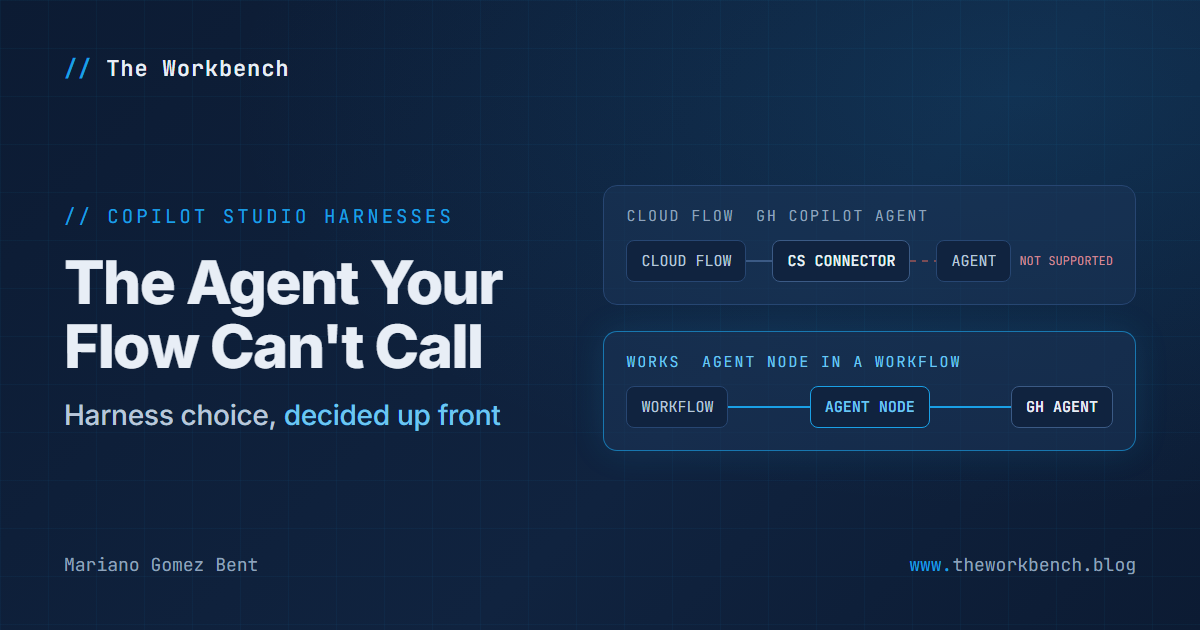
There is a particular kind of bad afternoon in this business. You have built the thing, it works, you demo it, everyone is happy. Then somebody asks the obvious follow-up question, the one that was always coming: "great, now can the nightly flow call it?" And you go to wire it up and discover that the answer is no, not because you did anything wrong, but because of a choice you made on day one without knowing it was a choice.
Microsoft published a short new article in mid-August that will save somebody that afternoon. It is worth reading before you build your next agent rather than after.
Background
The article is Call Microsoft Copilot Studio agents from Power Automate, new in the Power Automate documentation and last updated August 18, 2026. It opens with a two-row table, and that table is the whole post:
Standard harness: Call the agent from a Power Automate cloud flow by using the Microsoft Copilot Studio connector.
GitHub Copilot harness: Use the agent node in a Copilot Studio workflow. You can't call this type of agent from a Power Automate cloud flow by using the Microsoft Copilot Studio connector.
Now, a harness needs defining, because the word is new enough that plenty of people building agents right now have never seen it. Per the harnesses overview, you design the agent and the model supplies the reasoning, and the harness is the runtime sitting between the two: it decides when to call the model, what to send it, how to interpret what comes back, and which tools to call. Everything you build in Copilot Studio runs on one.
There are three. The GitHub Copilot harness powers agents and workflows built for reasoning-heavy, multistep work, and bills through Copilot Credits on usage. The standard harness powers rule-based agents and agent flows, where you define the topics and paths and get predictable behavior. The Copilot chat harness is for extending Microsoft 365 Copilot.
So the harness is not a setting you flip later. It determines how your agent reasons, how you are billed, and, as of this article, what can call it.
This was not one article
Here is the part that makes me confident this is a real platform move rather than a documentation footnote. That new Power Automate page did not arrive alone. Across the same week, roughly a hundred Copilot Studio articles were touched, and the substantive edits among them all point the same direction: Microsoft is retiring the informal vocabulary and replacing it with harness names everywhere.
Pages that used to say "the classic experience" and "the new agent experience" now say "the standard harness" and "agents powered by the GitHub Copilot harness." The telemetry articles were split along the same line: agent-level telemetry is now documented as available only with the standard harness, while environment-level telemetry works with both. The article on adding tools to an agent was amended to say that coding-agent skills can only be added to agents powered by the GitHub Copilot harness. Even the old skills article was reworded to name both harnesses explicitly.
One renamed page is housekeeping. A hundred pages renamed in one week, with capability boundaries drawn along the new names, is a platform telling you that this distinction is now load-bearing.
Why it matters
For makers, the practical consequence is a question you now have to ask at the start: does anything else need to call this agent? If a scheduled flow, an approval process, or an existing automation has to invoke it, you want the standard harness, because that is the one the Power Automate connector can reach. If the agent is going to be talked to by humans and needs to reason its way through messy multistep work, the GitHub Copilot harness is the more capable runtime, and you accept that your integration path runs through Copilot Studio workflows instead.
You may be asking whether that is a real constraint or just a temporary gap. The documentation does not say, and I am not going to guess. What it does say is what works today, and today the connector supports one harness and not the other.
For professional developers, the sharper point is that this is an architectural decision wearing the costume of a product setting. It sits alongside two others made at the same moment: your billing model, since the GitHub Copilot harness runs on Copilot Credits and the standard harness runs on the licensing model, and your observability model, since agent-level telemetry export is standard-harness only. Three consequences, one choice, made in a dropdown before you have written anything.
NOTE: there is a workaround, and it is a legitimate one rather than a hack, but it does change your topology. You call a GitHub Copilot harness agent from an agent node inside a Copilot Studio workflow. That means the orchestration lives in Copilot Studio rather than in Power Automate. If your organization's automation estate, source control, and deployment pipeline are all built around cloud flows, that is not a small relocation.
The demo concept
Build the same trivial agent twice, once on each harness, and then try to call both from one cloud flow. The standard harness agent answers. The other one is not selectable, because it never appears in the connector's agent picker at all.
That is the demonstration worth recording, because it is a negative result and negative results are what documentation tends to bury. Then build the workflow-plus-agent-node path for the second agent and show it working. Two agents, two integration paths, one screen recording, and nobody on your team ever has that bad afternoon.
Steps to recreate
First, the supported path. These steps are quoted from the new article.
1) Sign in to Power Automate.
2) Create a cloud flow, or open an existing cloud flow and select Edit.
3) In the designer, select the plus sign (+) where you want to call the agent, and then select Add an action.
4) Search for Microsoft Copilot Studio, and then select Execute Agent and wait.
5) If prompted, sign in with Microsoft Entra ID to create a connection.
6) In Agent, select the published standard harness agent that you want to call.
7) In Message, enter the instructions for the agent. You can add dynamic content from earlier steps in the flow.
8) Configure the optional inputs your scenario needs: Locale (the language of the message, as a BCP-47 locale), Conversation ID (an existing conversation ID, to continue an agent conversation), and Environment ID (the environment that contains the agent).
9) Add any actions that should use the agent's response, then select Save and test the flow.
A few things to note about that sequence. The word published in step 6 is not filler: an unpublished agent will not be there to pick, and that is the first thing to check when the dropdown looks empty. Execute Agent and wait blocks the flow until the agent responds, which is what you want when the next action consumes the answer; the article notes that if you do not need to wait, the plain Execute Agent action sends the message and returns the conversation ID instead. And that conversation ID is the interesting output, because passing it back in on the next call is what turns a series of one-shot invocations into an actual conversation. The action surfaces the last response, a list of responses, and the conversation ID as dynamic content.
Now the other path, for a GitHub Copilot harness agent:
1) In Copilot Studio, go to Workflows and open an existing workflow, or create a new one.
2) On the Add panel, select the Agent icon.
3) Under Agent, select An existing agent, and then select the published GitHub Copilot harness agent you want to call.
4) In Message, enter the instructions for this run, adding dynamic content from earlier workflow steps as needed.
5) Add the later workflow steps that use the agent response, and test the workflow before you publish it.
Notice the symmetry. Both paths are an agent-invoking step with a message and a response, and both want the target published first. The difference is entirely which product hosts the orchestration, which is exactly why the constraint is easy to miss until it bites: the shape of the work is identical, only the address changes.
Companion repo sketch
A small comparison lab. Two exported solutions, agent-standard/ and agent-ghcopilot/, each holding the same deliberately boring agent so the harness is the only variable. A flow-caller/ solution with the cloud flow that calls the standard harness agent through Execute Agent and wait. A workflow-caller/ solution with the Copilot Studio workflow that reaches the other one through an agent node.
Then the file that makes the repository worth cloning: a MATRIX.md recording what each harness supports, with the observed result and the date beside every row. Connector callable, agent-level telemetry, coding-agent skills, billing model. Date every row, because this is a moving platform and an undated compatibility matrix is worse than none at all. It ages into confident misinformation.
Final Notes
The change itself is one table in one short article. What makes it worth your time is the timing: it landed in the same week that a hundred sibling pages were rewritten to make harness the organizing noun of the whole product. That is not a coincidence, and it is a reasonable bet that more capability boundaries get drawn along this line before the year is out.
So ask the integration question first. Before the topics, before the knowledge sources, before anybody sees a demo: what needs to be able to call this? The answer picks your harness, and the harness picks a great deal else.
What I learned from this exercise: the most expensive decisions on a platform are rarely the ones that look like decisions. They look like defaults.
Until next post!
MG.-
Mariano Gomez Bent
Former Microsoft BizApps MVP

Comments