
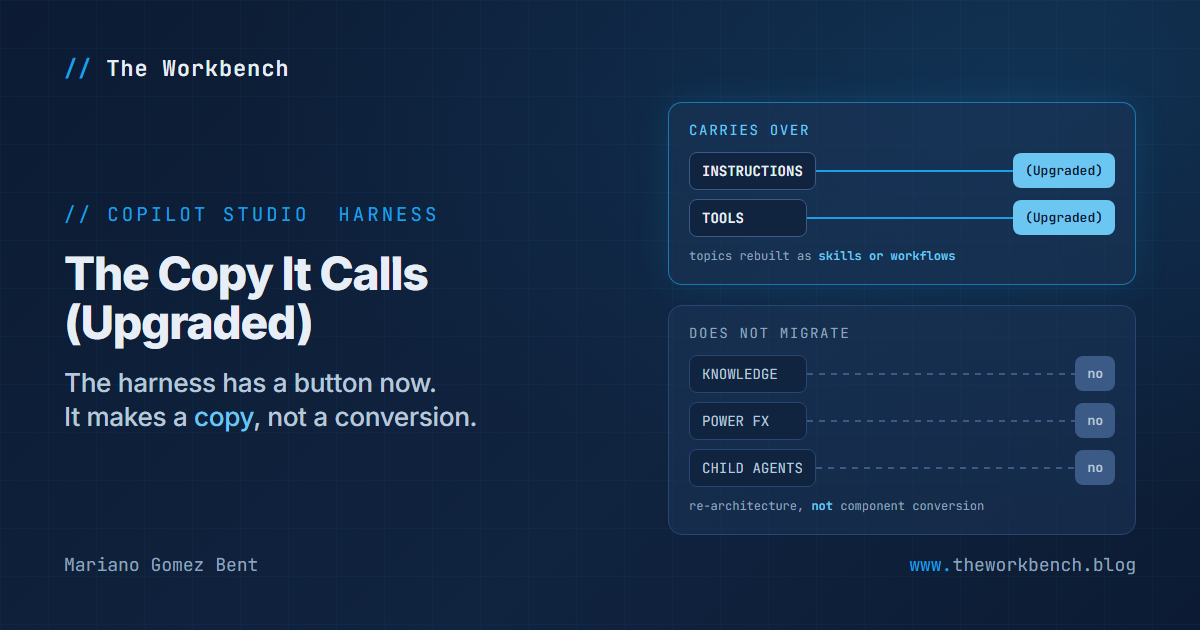
Copilot Studio will now move an agent from one harness to another, and you start it by typing a sentence into the home page: "upgrade my Coffee Coach agent." It carries over the instructions, the tools and the suggested prompts, and it can rebuild your topics as skills or workflows. It does not bring the knowledge sources.
A few days ago (Sep 21), I published The Agent Your Flow Can't Call, which argued that the harness you pick for a Copilot Studio agent is an architectural decision that looks like a product setting, and that it is not something you flip later. Six weeks on there is a button that looks a great deal like flipping it later, and a second new article explaining at length why you should not think about it that way.
What changed
Upgrade agents to the Microsoft Copilot harness is new and in preview. You ask for it in natural language and answer questions as it goes; the documented procedure is in the steps further down. The new agent's tile carries its old name followed by (Upgraded).
That word is doing real work. The upgrade does not convert your agent, it builds a second one beside it, and the original keeps running on the standard harness. So the question is never "did the upgrade work" but "is the copy good enough to replace the original."
The page's Limitations section lists three things the upgrade does not migrate:
- Knowledge sources. The page now adds that this harness does not support Azure AI Search as a knowledge source at all, so an agent grounded that way does not get the grounding carried over, and the documented ways back are connecting Foundry IQ as a tool or adding the Azure AI Search connector as a tool.
- Power Fx expressions
- Child agents
Look at what that list has in common. Those are the three places a mature standard harness agent keeps its actual business logic: what it knows, how it computes, and who it delegates to. The things that do carry over, instructions and tools and suggested prompts, are the things you could retype in an afternoon. So the upgrade carries what is quick to recreate and leaves what is not.
NOTE: the upgrade consumes Copilot Credits, and so does everything the resulting agent does afterwards. The standard harness bills on the Copilot Studio licensing model and the Microsoft Copilot harness bills on usage, so an upgrade is also a billing migration. Run it in a non-production environment the first time.
The guidance that arrived with it
The more interesting new page is Compare Copilot Studio agent harnesses, long-form architecture guidance rather than reference documentation. Two sentences in it state its position: "Treat migration as re-architecture rather than component conversion," and, plainly, "A functioning standard harness agent doesn't need to move simply because another harness is available."
So the platform shipped a one-sentence upgrade and, at the same time, guidance saying the upgrade is not the migration. That is not a contradiction. Microsoft's position is that the upgrade starts a rebuild rather than completing one, and that treating its output as a finished agent is the error to avoid. The article warns in the other direction too: a more capable harness can overwork a simple problem, adding reasoning, latency and credit consumption without improving the result.
The harness names moved twice
Before anything else, a naming note, because it will cost you a search otherwise. As of November 13, 2026, what this post and its September predecessor call the GitHub Copilot harness is named the Microsoft Copilot harness in the documentation and the product. The upgrade article is now titled "Upgrade agents to the Microsoft Copilot harness", and the overview lists Microsoft Copilot, Customer Conversation and standard. Nothing about the behavior below changed with the name. The text here has been updated; if you are looking at an older post of mine, read "GitHub Copilot harness" as "Microsoft Copilot harness".
The third harness is not the one I named
Correction, and it is the useful kind. The September post said there were three harnesses and named the third as the Copilot chat harness, for extending Microsoft 365 Copilot. That was accurate when it was written. It is not accurate now.
The overview's third harness today is the Customer Conversation harness, in preview, and the Copilot chat rows were removed from that article's comparison tables when it arrived. An agent built on it is called a Customer Assist Agent, and it is aimed at contact-center work: voice and chat, sub-agents that each carry their own escalation path to a human representative, prebuilt Escalate and Biometric Authentication tools, publishing to a website chat or to a phone number.
That is a different purpose from a harness for extending Copilot Chat, so this is a replacement rather than a rename, and anything written against the earlier lineup now names a harness the overview no longer lists. Including, as of six weeks ago, mine.
The two-row table is still a two-row table
Here is the part that matters more than the correction. I re-read Call Microsoft Copilot Studio agents from Power Automate on October 30, and it is unchanged: a standard harness agent is callable from a cloud flow through the Microsoft Copilot Studio connector, and a Microsoft Copilot harness agent is not. The September post's central constraint holds.
But the table still has exactly two rows. It does not mention the Customer Conversation harness at all. Neither does the telemetry overview, which splits agent-level telemetry (standard harness only) from environment-level telemetry (both standard and Microsoft Copilot) without a third column. Neither, remarkably, does the new guidance article, which is titled "Compare Copilot Studio agent harnesses" and compares two of them.
Other pages have caught up. The tools overview documents its file-size and MCP server limits as applying to both the Microsoft Copilot and Customer Conversation harnesses, and there is now a separate MCP server article per harness.
So the three-harness model is declared in the overview and is arriving unevenly everywhere else. The practical consequence for a reader is a reading rule: when a capability page is silent about the Customer Conversation harness, the honest conclusion is that the documentation does not say, not that the answer is no. Not stated and unsupported are different claims.
Why it matters
For makers, the September advice survives with one amendment. Ask the integration question first, because the connector still reaches one harness and not the other. The amendment is that "I picked wrong" is no longer fatal: there is a documented path off the standard harness, it is in preview, and it hands you back an agent with no knowledge sources attached. Budget for reattaching them rather than discovering it.
For professional developers, the sharper point is what the exclusions describe. They describe the target runtime: it does not evaluate Power Fx, and its delegation model is not the standard harness's child-agent model. If your agent's value lives in those two places, the upgrade gives you a starting point rather than a nearly finished rebuild, and the guidance article is accurate when it calls that re-architecture.
The demo concept
Take a standard harness agent that has all four of the things at issue: instructions, a tool, one knowledge source, and one Power Fx expression in a topic. Run the upgrade. Then open the report it gives you and walk the (Upgraded) copy side by side with the original, naming which of the four survived.
That is the demonstration worth recording, because the interesting output is not the new agent. It is the report, and the gap between what a reader assumes "upgrade" means and what the Limitations section actually says.
Steps to recreate
These steps are quoted from the upgrade article.
1) On the Copilot Studio home page, enter something like "upgrade my Coffee Coach agent" in the input box.
NOTE: that input box is on the preview host, copilotstudio.preview.microsoft.com. On copilotstudio.microsoft.com, the host the documentation links to, the home page has no input box and no Chat page, so step 1 cannot be started there at all. I checked this on November 13, 2026 in two environments on each host, signed in as the same user: the production host served zero input elements on Home, and the preview host served one, a textarea reading "Describe what you want to build". The upgrade article says only "the Copilot Studio home page" and its sign-in links point at the production host. If you are following the article and the first step looks impossible, check your address bar before you check your licensing.
2) Follow the progress of your request in the chat. Copilot Studio prompts you to confirm or clarify details as needed, for example whether it found the right agent, or what you prefer to do with specific features of the original.
3) When Copilot Studio finishes, your artifacts, meaning the new agent and any workflows, appear as cards in the chat. The tile for the new agent shows its name followed by (Upgraded).
4) Select the Open icon on any card to view or customize the artifact.
Three is where the work is. The upgrade "reports what was migrated, what requires attention, and what was skipped," and that report is the only place the skipped items are listed.
What the documentation does not give is a procedure for putting back what was skipped: no stated path for reattaching knowledge sources, re-expressing a Power Fx expression in the new runtime, or rebuilding a child agent as a connected agent or sub-agent. I am not going to invent one. Treat those three as design work on the other side of the button.
The September constraint is unchanged on both sides, so if a cloud flow calls the agent you are upgrading, that flow stops being able to reach the copy.
The companion repo
The September post sketched a repository with a MATRIX.md in it and said the matrix was the file that would make the thing worth cloning. It also said to date every row, because an undated compatibility matrix ages into confident misinformation.
That file now exists: copilot-studio-harness-matrix. One dated matrix across all three harnesses, with the Microsoft Learn page linked beside every row: what can call each one, what telemetry each supports, which capabilities each has, the published Microsoft Copilot harness runtime limits, and what the upgrade does and does not carry. Cells read Not stated where the documentation is silent, because Not stated and unsupported are different claims. A HISTORY.md records what has already moved, including the third-harness swap above.
It is read out of documentation, not measured in a tenant, and it says so at the top. That is the honest scope for a matrix anyone can re-derive by opening nine links.
Final Notes
The September post argued that this choice is easy to make without noticing it is a choice. Six weeks later there is a button that makes it look reversible, and a guidance article setting out what reversing it involves: rebuilding the knowledge, the expressions and the delegation yourself.
Which leaves the question in a better place. It is no longer "pick correctly or live with it," it is "pick correctly, because the exit costs you the knowledge, the expressions and the delegation." A constraint you can plan around is worth more than reassurance.
What I learned from this exercise: when a platform ships a migration path and guidance about it in the same month, read the guidance first. The cost is written down there, and here it is three things the upgrade does not carry.
Until next post!
MG.-
Mariano Gomez Bent
Former Microsoft BizApps MVP

Comments